Samsung Galaxy A7 (2018) Review in Hindi, Samsung Galaxy A7 (2018) review

0

South Korea mobile manufacturer Samsung’s latest smartphone of Galaxy A Series Samsung Galaxy A7 (2018) Launched in September last month. Galaxy A7 (2018) is the first smartphone in the Samsung brand that has been launched with a triple rear camera setup. Samsung has new smartphones of A series this month Galaxy A9 (2018) Has also launched. Samsung Galaxy A9 (2018) is the first smartphone that comes with a quad camera setup i.e. four rear cameras. Buying Samsung Galaxy A7 (2018) is a profitable deal or not? Let’s know based on specifications and features.

Samsung Galaxy A7 (2018) Design

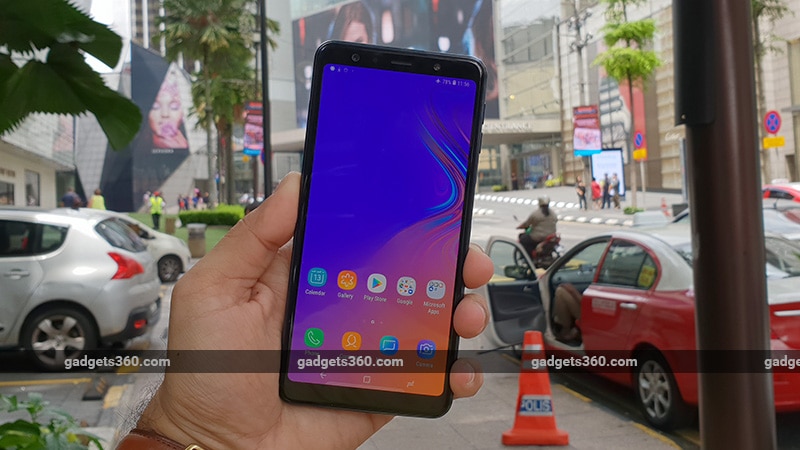
Samsung has shown something new with its A series smartphone. When the curtain was first lifted from the A series, handsets were equipped with metal unibody and IP certification. Galaxy A7 (2018), Galaxy A9 (2018) and Galaxy A8+ (2018) The glass panel has been used on the back panels of all three smartphones. On touching the frame, it gives plastic feel and the frame in the air conditioner room does not cool. The Galaxy A7 (2018) has a 6 -inch display that comes with 18.5: 9 aspect ratio. Samsung has named it as Infinity Display, but it does not have a curved age like Galaxy S9 and Galaxy Note 9. The thickness of bezel on the side of the phone is slightly higher. The earpiece, selfie camera, flash and sensors have found space above the screen. On the bottom of the phone is micro-USB port, 3.5 mm headphone jack and loud speaker.
20181013

According to the price of Samsung Galaxy A7 (2018), it was expected that the company would use USB Type-C port in its smartphone. A separate fingerprint sensor has not been provided for security. You will see a power button on the side of the phone, the company has integrated the fingerprint sensor in this. In addition to the power button on the right side, there is a button to raise and reduce the voice. Similarly, the fingerprint sensor’s Canconson was also seen in Samsung Galaxy J6+. If the phone is caught in the right hand, the fingerprint sensor can be easily used. The weight of the phone is 168 grams. A vertical triple rear camera setup with LED flash on the back panel will be found. Met rim is present on the side to protect the camera sensor. The fingers on the glass back panel easily fall.

Samsung Galaxy A7 (2018) Specification and Software

The Galaxy A7 (2018) has a 6 -inch Super AMOLED Full HD+ display. The viewing angles are quite good, as well as we did not have any kind of problem in looking at the display in the outside light. We had no complaint from the display while watching the video. Dolby Atmos support will not be available not on loud speakers but while using headphones. The Galaxy A7 (2018) has used the Exynos 7885 octa-core processor for speed and multitasking. The phone will be available in two storage variants, 4 GB RAM/64 GB storage and second 6 GB RAM/128 GB storage variants.

Both variants come with 3,300 mAh battery, Bluetooth version 5, dual-band WiFi 802.11 AC, GPS, Glonas support. In this Samsung brand smartphone, instead of NFC support, the company has given a mini feature of Samsung. Accelerometer, gyroscopes, proximity and ambient light sensors are part of the phone. Both SIM slots support 4G and volt.

Galaxy A7 (2018) runs on Android 8.0 Oreo based Custom Experience UI. We have a smartphone for review on the September 2018 security patch. In the phone you will already find many apps pre-install. Settings app is slightly different from stock Android. We did not have any problem while looking for a feature in the setting, the search button works correctly. The smartphone has Samsung virtual Assistant Bixby. Like the Galaxy A9 (2018), there will be no separate button for this in the handset. By swiping the right side on the home screen, you will be able to access Samsung Assistant.

20181013

Apps such as Google, Microsoft Office Apps, Amazon, Prime Video, Dailyhunt, Samsung Mall, Samsung Max (Data Saving App), Samsung Pay Mini and My Galaxy will arrive. Samsung’s popular features such as S Bike Mode, S Power Planning and S Secure will not come pre-install in advance, but you can download these apps from Google Play Store. If you keep looking at the display, Samsung Smart stay feature will not allow the display to be closed. With the help of palm swipe gesture you can easily take screenshots. Like dual apps in smartphones of other companies, this Samsung phone comes with dual messenger facility.

Samsung Galaxy A7 (2018) Performance, Battery Life and Camera

The exynos processor given in Galaxy A7 (2018) is not slow in any sense. The octa-core chipset does not slow down or any kind of problem while navigating the user interface of the phone. Talking about multitasking, we opened many apps simultaneously but the phone did not slow down on any stage. Fingerprint sensors and face unlock features work fast. Galaxy A7 (2018) at Antutu Benchmark 1,19,786 points. Geekbench scored 1,525 and 4,368 respectively in single-core and multi-core tests. The Galaxy A7 (2018) scored 29fps in the Geekbench T-Rex Test.

Let us know that this benchmark score MediaTek Helio P60 Nokia 5.1 Plus (Review) And Qualcomm Snapdragon 636 chipset with Motorola One Power (Review) The benchmark is in the range. Both these smartphones are phones priced below Rs 15,000. We found that Xiaomi Mi A2 (Review) And Poco F1 smartphone has scored more in these tests. The price of both handsets of Xiaomi brand is lower than Samsung Galaxy A7 (2018).

20181013

We saw the PUBG game playing, we will advise you to keep the phone on medium graphics. While playing the game, the phone definitely slowed down a bit, but in half an hour the phone starts to heat up. The Galaxy A7 (2018) gives 15 hours and 40 minutes backup in HD video loop test. Once charging the phone, we kept the WhatsApp account active throughout the day, calling, navigation, gaming etc. on Google Maps, the battery lasted throughout the day.
normal
Scene
20181012
20181013

Now talk about the camera. The Galaxy A7 (2018) has a 24-megapixel primary sensor with f/1.7 arpchar, a 5-megapixel depth sensor with F/2.2 arpchar and an 8-megapixel ultra-wide lens with F/2.4 fertilizer. The camera app includes features such as panorama, pro, beauty, live focus, slow motion, AR emoji and hyperlaps mode. The viewfinder has features such as Bixby Vijin and Quick Share, with the help of which the camera app can send the picture directly to Facebook and Facebook Messenger. Flash, filters and cameras are also control features for switcher. Here you will find a button that will help you switch between primary camera and wide-angle.

A 24 -megapixel primary camera takes a good picture in daylight. The 8 megapixel sensor will help you when shooting in landscape. While shooting on macro mode, the phone focuses quickly on small things, it maintains a difference between the background and the subject, which makes the photo look good. The picture taken in the light of the day came sharp, while the sharpness in the photo is not much after taking the photo inside the house. We are hoping that if the company offers a pixel bining feature in the Galaxy A7 (2018), it will help in taking a better picture in low light. Selfies were very good, they can be shared on social media apps. The beautification mode remains automatic. If you want a natural output, you can set it on manual mode. The phone also has an automatic HDR feature for selfie.

Our decision

Galaxy A7 (2018) is the first Galaxy smartphone that comes with three rear cameras. This sensor will help you in taking better pictures in different situations. A 3,300 mAh battery has been given to revive the phone. The battery life of the phone is very good due to the impressive processor. Glass back panel gives a premium look. We are not more satisfied with the fingerprint sensor present on the side of the phone. The reason behind the speed of the sensor is that if the phone is caught in the left hand, then there may be some problem in reaching the hand with the sensor and using it. Galaxy A7 (2018) is a good phone for Rs 23,990. If you want a powerful processor, then you can buy Poco F1 or Vivo V11 Pro with this price segment present in the market.

Nokia 5.1 Plus Review in Hindi, Nokia 5.1 Plus Review

0

Most of the smartphones launched by HMD Global, a Nokia brand smartphone company, are part of the Google Android One program. Under the Google Android One Program, a three -year security update and two -year software update are guaranteed. HMD Global made Nokia 7 Plus equipped with Android One Program this year and Nokia 6.1 Plus and Nokia 5.1 Plus Launched together in August. HMD Global recently launched Nokia 5.1 Plus. The Nokia 5.1 Plus is priced at Rs 10,999. At this price you will get 3 GB RAM/32 GB storage variants. Nokia 5.1 Plus has better specifications compared to Nokia 5.1. Let us give you information about the design, software, camera, battery life etc. of the phone in detail.

Design of Nokia 5.1 Plus

After holding Nokia 5.1 Plus in hand, the first attention will go towards the premium look of the phone. The entire body of Nokia 5.1 Plus is made of high-gloss, which gives the phone a stanning look. Looking at the phone, it seems that its price will be above Rs 15,000. At this price, the company has also used 2.5D curved glass on the back panel. Being a glassy finish, the Nokia 5.1 Plus has a splutter which makes it a slipry. There were many such incidents with us when the phone fell on the couch and floor, but there was no mark on it.
The phone has a 5.86 -inch display (720×1520 pixels) with an aspect ratio of 19: 9. HMD Global has cut the corner to reduce the price of the smartphone. The phone’s display is not useless, color vivid and effectively appear, black level is also good. Brightness is in sufficient amount in sunlight, due to which there is no problem while reading things on the display.
Nokia

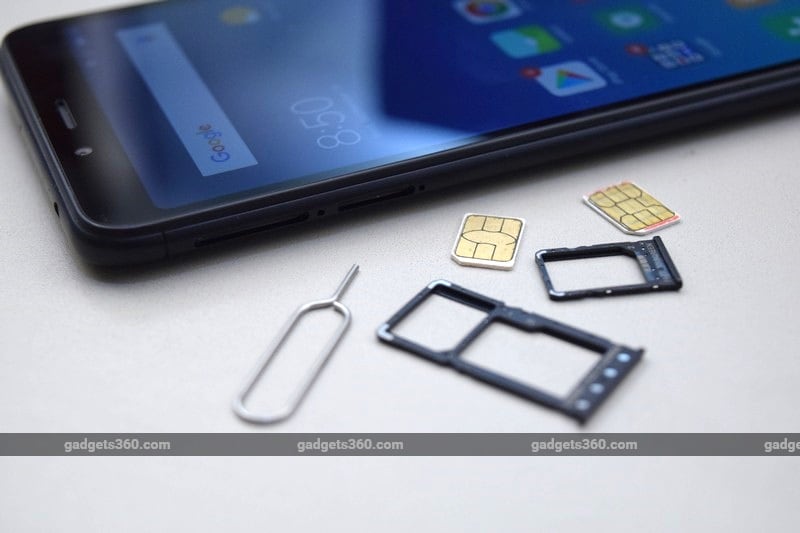
All buttons are given on the right side of the phone. In this budget segment, this Nokia brand smartphone comes with USB Type-C port. On the left, you have a SIM-Trail (two Nano SIM) which comes with dual 4G volt support. It is possible to increase the storage with the help of microSD card but for this you have to remove the second sim. This means that one can apply a Nano SIM and a card at a time. The Nokia 5.1 Plus Nokia design is quite big. The notch has not been used correctly, because the notification LED has not been given by the company in the Nokia. You will get a headset with the phone, but the company has not given a silicone cover for a smartphone with slipper body. Overall Nokia 5.1 Plus is a great phone. The handset is light with a premium look.

Specifications and features of Nokia 5.1 Plus

Nokia 5.1 Plus will have a MediaTek Hilio P60 octa-core processor for speed and multitasking. Recall that HMD Global used Hilio P18 chipset in Nokia 5.1 smartphone. At this price, this chipset has scored more benchmarks than Snapdragon 636 chipset. While writing the review, this phone is being sold only with 3 GB RAM/32 GB storage variants. Talking about connectivity, the smartphone will come with 3 LTE, dual-band WiFi 802.11 AC, Bluetooth version 4.2, FM radio, USB-OTG and GPS support. But you will not get NFC support in this handset.
Nokia

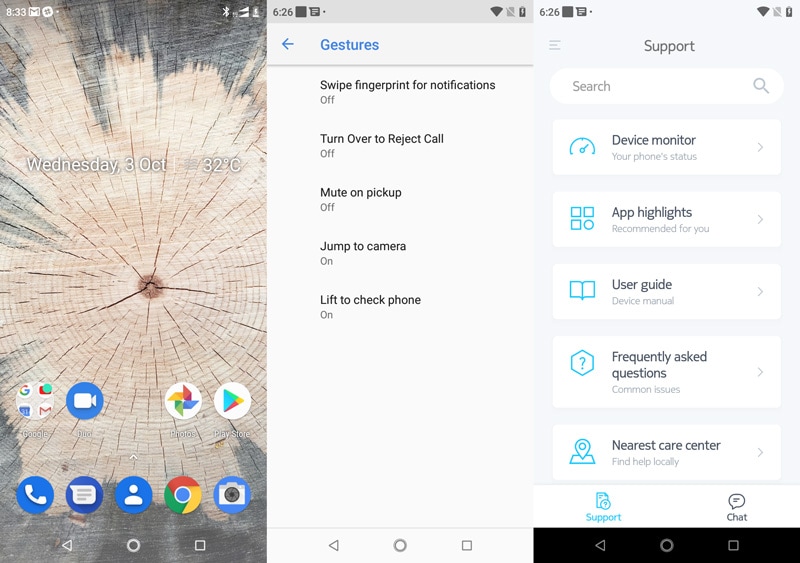
Nokia 5.1 Plus runs on Android 8.1 Oreo. Apart from Google Apps, the phone has a support app of HMD Global, which provides the user related help related to the feature of the phone or appointment booking in the service center. If the power button of the phone is pressed twice, the camera app opens. Nokia 5.1 Plus does not have the option to hide the notch, it is not a major problem because games or video players do not stretch more than Nokia.

Nokia 5.1 Plus performance, camera and battery life

During the review, we enjoyed a lot while using Nokia 5.1 Plus. Due to the glass finish, the targets of the fingers are easily on them, but once cleaned, the marks are cleaned. If you want that there is no mark on the glassy finish, then keep it cover for it. The phone works correctly without using GPS in navigation, chatting and Uber app. While running the game, the space near LED flash starts heating up soon. The phone is not hot. If the PUBG game is played for half an hour, the phone starts getting completely hot. There is a single loudspeaker on the lower back, the sound when full volume is quite loud. There will be a microphone for the call but the button is not given to control the music playback.

The camera resolution has been reduced in Nokia 5.1 Plus compared to Nokia 5.1. Recall that Nokia 5.1 had a 16 -megapixel sensor on the back panel, while you will get a 13 -megapixel primary sensor and 5 megapixel depth sensor in Nokia 5.1 Plus. But after reviewing, we have no complaint with the rear camera. If the light is in sufficient quantity while clicking the picture in a landscape shot, then the sensor gives better photo quality. Even with auto-HDR, the sensor does not give the exposure correct at times. Portrait mode is the quality of the secondary depth camera average. After blurring, the photo gives an artificial look instead of real. Apart from this, additional camera features have also been provided, such as you can also apply masks on someone’s face. Beauty mode can be adjusted as convenience, the rear and front camera also have dual, P-i-P, manual and panorama mode.

nokia
nokia
nokia
nokia

The phone is capable of recording video on 1080p, stabilization will always be on, there is no option to close it. Due to electronic stabilization, Shimmer effect will not be seen much when there is sufficient amount of light, but the quality of the video was very poor while shooting at night. In this, you will also get a slow-motion shooting feature which records at a 720p resolution at an average of 120 frames per second. There will be an 8 -megapixel selfie camera, which gives a good picture when there is a sufficient amount of light, the screen flash at night does not prove to be effective. The speed of the focus slows down in low light and the landscape mode is affected.

There is a 3060 mAh battery to revive the phone, the battery life of the phone is also good. Once charged, we used the phone all day. The phone gives a backup of 14 hours 36 minutes in HD video loop test. Nokia 5.1 Plus does not come with fast charging support, but the 10 watt charger with the phone charges up to 56 percent of the phone in an hour. The phone may take about 2 hours to have a full charge.

Our decision

It would not be enhanced to say that Nokia 5.1 Plus is a great option at a price of Rs 10,999. We can understand that at this price, smartphones of other companies give high resolution, but during the review, we did not have any problem while using HD+ display. Hybrid dual-sim slot can knock you, if you want to put two nano sim and card simultaneously. The video performance in low light is less than the average. Nokia 5.1 Plus is a smartphone with great look at this price. Apart from this, it is part of Handstate Google’s Android One program, battery life is good and also the powerful chipset has been used in this handset of Nokia brand.

How much power in Honor 8X Hands-On Preview, Honor 8X? At first sight

0

Handset Manufacturer Huawei’s sub brand Honor is its mid-range smartphone in India on 16 October Honor 8x Will launch Honor 8X will be an upgrade version of Honor 7X launched last year. The new Honor 8X will get a vertical dual rear camera setup on the back panel for photography. High Silicon Kirin 710 chipset has been used for speed and multitasking. This handset of Honor brand Xiaomi Redmi Note 5 Pro And Nokia 6.1 Plus Will compete with It is expected that the price of Honor 8X in India can be between Rs 15,000 and 20,000. Honor 8X with premium design and better software will prove to be a profitable deal for this festive season customers? We spent some time with the phone during the pre-launch event, let us tell you about its specifications and features.

Honor 8X Design and Specifications

Honor 8X gives a premium look but at the same time this smartphone is also strong. Its phone design is so good that it is not getting a phone call from the budget segment less than Rs 20,000. Dual-tone color scheme has been used on the back panel. Honor 8X has a 6.5 inch (1080×2340 pixel) IPS LCD display with an aspect ratio of 19.5: 9. Like other Honor smartphones, you will get a notch design in this phone too. The display of this Honor brand’s smartphone uses at least 2 knots brightness, which is why your eyes will not feel any problem while using the phone where there is no light.

The bottom of Honor 8X is quite thin than Honor 9N and Honor Play. No button is given on the lower back, you can easily use any option of on-screen or EMUI gestures. On the left side of the phone is a sim-tray (two nano SIM and microSD card slot). On the right side, the phone will get buttons to lock/power and to increase and reduce the voice. At the bottom, you have loudspeakers, 3.5 mm headphone jack, primary microphone and micro-USB port. At this price, the company has decided not to give USB-Type C. Secondary microphone has found a place over the phone.

Honor

A vertical dual rear camera setup will be seen for photography on the back panel. There is a 20 -megapixel primary sensor and a 2 -megapixel depth sensor with F/1.8 aerpatcher. A 16 -megapixel front camera will be available for selfie and video calling, its appearance is F/2.0. Honor 8X rear and front camera comes with AI feature. If you want, you can also use or close the AI ​​feature according to your convenience. Honor 8 takes a bright close-up and wide-angle picture in the light present in the house. In different circumstances, we will soon bring a review for you to tell how much the phone’s camera sensor is up.

There is a fingerprint sensor and face unlock feature on the back panel for security. After spending some time with the phone, we found the fingerprint sensor fast and accurate. The face unlock feature also works rapidly, but it has some difficulty in working accurately in low light. The smartphone has a Nifty feature which increases the brightness of the screen in low light so that your face can be identified properly, we will be able to give you information in our upcoming review. This will be the first smartphone equipped with this chipset in the Indian market. The company says that it gives better performance than Qualcomm Snapdragon 660 chipset. The phone will have three RAM/storage options. 4 GB/ 64 GB storage, 6 GB/ 64 GB storage and its top variant will get 6 GB RAM/ 128 GB storage. The phone comes with a 3,750 mAh battery and it comes with 5V/2A (10 watt) charging support.

Honor 8X software

The Honor 8 X runs on the EMUI 8.2 skin based on Android 8.1 Oreo. Right now the company has not announced the date, how long the phone will get Android Pie software update. The number of pre-install apps in the Honor brand smartphone has been reduced. Apps like Facebook, Facebook Messenger, Netflix, Camera 360, Lords Mobile, Phone Manager, Hicare, APPGALLERY, Health, Honor Club, Ride Mode and Party mode will be found. Apart from this, Google apps such as Gmail, Google Maps, YouTube, Google Drive and Google Photos are apps. We will give you information about how strong it presents in the phone’s battery test. Honor claims that the PUBG game can be easily played in the phone on the media setting.

How much power in Samsung Galaxy A9 (2018)? At first sight

0

The Samsung Galaxy A series is placed between the Samsung Galaxy J and the Flagship S series. This means A series phones come with better hardware and build quality compared to the Galaxy J series. Recently South Korea’s mobile manufacturer Samsung Samsung Galaxy A9 (2018) Smartphone has been launched. This is the company’s first smartphone launched with four rear cameras. We spent some time at the time of Samsung Galaxy A9 (2018), let us tell you about some of its important specifications, features.

Galaxy A9 (2018) to see Galaxy A7 (2018) Sounds like, but this Samsung handset is slightly larger. It has a 6.3-inch full-HD+ (1080×2280 pixels) Infinity display, with a super amoled panel. Its aspect ratio is 18.5: 9. The contrast level and viewing angle of Galaxy A9 (2018) is good. The back panel of this Samsung handset is made of 3D curved glass and mid-frame metal, due to which it gives a premium look after holding the phone in hand. This phone will be made available in bubblegum pink, cavier black and lemonade blue colors. The finish of the phone is also very good which makes the phone attractive, this phone can be liked by those who pay a lot of attention to the look of the phone while buying a smartphone.

To increase power and voice on the right side of the phone and the Biksbi button on the left. In the Galaxy A7 smartphone, we saw the fingerprint sensor concept on the side panel of the phone but the sensor in Galaxy A9 is on the back panel. If the phone is caught correctly in the hand, the fingerprint sensor can be easily used. Keeping in mind the different situations, the Galaxy A9 (2018) has four rear cameras. The rear camera setup of the phone is its biggest feature.

Galaxy

The phone has a 24 -megapixel primary camera with F/1.7 aperture. The second is a 10 -megapixel telephoto camera. It is equipped with 2x optical zoom and F/2.4 aperture. It is given with an 8-megapixel ultra-wide camera that comes with 120 degree lens and F/2.4 aperture. Finally there is a 5 -megapixel depth camera whose aperture is F/2.2. The 24 -megapixel primary sensor scene uses AI in optimizer mode and also recognizes the difference in 19 scenes.

It has a 4-in-1 pixel binning which helps the lens to capture more light in low light. Like other smartphones, Galaxy A9 (2018) also uses depth sensor when clicking the picture on Bokeh mode. The Samsung Galaxy A9 (2018) has a 24 -megapixel front camera with F/2.0 aperture for selfie fans. The blur’s level and re-focus can be set even after taking the picture. Right now we have not been able to test the camera performance, but we will give you information about it in our review.

The handset has a Qualcomm Snapdragon 660 processor. The four core has the highest clock speed 2.2 GHz and the other four core speed is 1.8 GHz. This is a powerful processor, the use of this chipset Nokia 7 Plus And Xiaomi mi a2 ,ReviewIt happened in. There will be 6 GB and 8 GB RAM options for jugalbandi. The inbuilt storage of Samsung Galaxy A9 (2018) is 128 GB. MicroSD cards up to 512 GB can be used if needed. Galaxy A9 (2018) is a dual-sim (Nano) phone. Apart from fingerprint sensor, the phone also has a face unlock feature for security.

The connectivity feature includes 4G VoLTE, Wi-Fi 802.11 AC, Bluetooth 5.0, USB Type-C, NFC and 3.5mm headphone jack. Accelerometer, ambient light sensor, gyroscope, magnetometer, proximity sensor and RGB light sensors are part of this phone. The handset has a 3800 mAh battery which supports fast charging. This smartphone comes with Bixby Assistant and Samsung Pay. The Galaxy A9 (2018) smartphone out of box will run on Android Oreo. Like other Samsung smartphones, you will also get some apps in this handset.

The Samsung Galaxy A9 (2018) is priced at 599 euros (about Rs 51,300) and 549 Great Bitrain Pounds (about Rs 53,700). It will be made available in the month of November. In the launch event, no information was given regarding the launch of Samsung Galaxy A9 (2018) in India nor its Indian price was revealed. This phone will be made available in bubblegum pink, cavier black and lemonade blue colors. We will soon give our readers in detail the camera, battery, software in the Samsung Galaxy A9 (2018) review.

How to Take Screenshot on PC, how to take screenshot on desktop

0

You are working on a computer/laptop and suddenly you need to take a picture/screenshot of a window or background item. What will you do now? Some people start searching for their camera or mobile at such times, which is very ridiculous. That is why it is important that you know how to take screenshots.

How to take screenshot in Microsoft Windows


1. first made on keyboard Print Screen Or PrntScr Press the button.

2. then ms paint (MS Paint) Open the app and press ctrl+V.

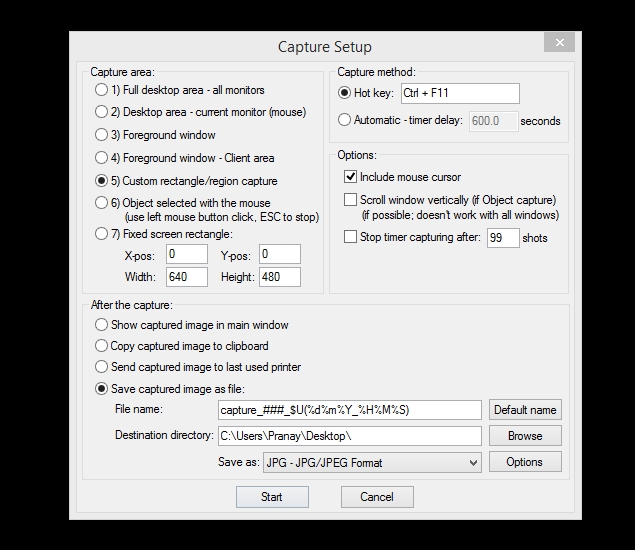
If you want more commands over your screenshots, we recommend using IrfanView (IrfanView) download. After installing it, follow the tips given below and capture screenshots.

1. First, press C, then choose the type of screenshot you want. You can choose between fullscreen capture or a multimonitor setup to capture a specific monitor, a foreground window, or a specific area of ​​the screen. If you want a screenshot of a specific part of a page or image, then you should use the fifth option. (Custom rectangle/region capture) Should choose.

2. First click, then move your mouse to select the area you want to screenshot. Click again to save the screenshot or press Esc to cancel this action.


How to take screenshot in Mac


1. If you want a screenshot of the entire screen area, cmd + shift + 3 Press.

2. If you want to take a screenshot of a specific part of the screen, cmd + shift + 4 Press. After this, click and drag the cursor so that the part of the image you want can be selected. Click once again to save the screenshot to the desktop.

browser addon
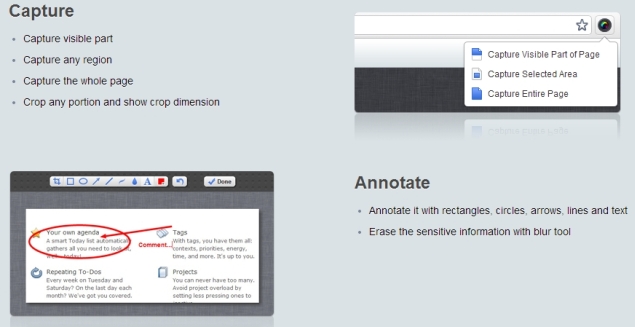
Very few webpages fit in your browser window. You often have to scroll down to view the entire content of a webpage. Sometimes it happens that you are on an interesting webpage and need its screenshot. In such a situation, the above methods will not prove to be completely effective, because you will be able to take a screenshot of only that part which is visible in the browser window. You can use the Chrome extension Awesome Screenshot to capture a screenshot of an entire webpage. It is also available on Firefox, Opera and Safari.

1. Once you’ve installed this extension, click on the camera icon on the right side of the browser.

2. Then select “Capture entire page” (or press ctrl + shift + E).

3. This extension will open the saved screenshot in a new tab. Here you can edit the screenshot, such as cropping, adding text, or highlighting important parts of the page. All this will be possible through the tools below the address bar.

4. Once editing is complete, press the “Done” button on the right side of the tools. Now while saving the screenshot, you will be able to see many options on the right side of the page (such as local save or Google Drive). Choose the option as per your wish and then your screenshot is ready.

How to Use Laptop as Wi-Fi Hotspot

0

Man gets trapped in strange situations according to his needs. Suppose you have a network cable but no Wi-Fi router, but five people need to use the Internet at the same time? Or you may have a 3G dongle that works on a laptop, but is useless on a Wi-Fi only tablet. It is possible that you too may get trapped in this situation. How wonderful it would be to be able to share your Internet connection across users and devices without a router.

You can share your laptop or desktop’s Internet connection with another device via Wi-Fi, and most of the time it’s easy to do. Mac users don’t have any trouble because setting up Internet sharing in OS X is just a few clicks. However, this process is a bit complicated for Windows users. Even built-in options sometimes don’t work due to complex setup processes and reliability issues.
Would.

Internet Sharing on Windows 7, Windows 8, or Windows 8.1

The good thing is that there are many apps available in the market that can turn your machine into a Wi-Fi hotspot. But before using it, get information about Windows built-in sharing on Microsoft’s website. Let’s hope your luck is better than ours. We would suggest that you ignore this process and use a third-party app, as it will generally provide a better experience.

We tested popular apps Connectify and Virtual Router Plus. Had a bad experience with Virtual Router Plus. The installed anti-virus detected it as a threat to the system, and during installation it tried to install many unwanted software. No such problem occurred with Connectify. This is a reliable app to turn your computer into a Wi-Fi hotspot.

This process requires you to use a Windows computer that has a Wi-Fi adapter (or built-in Wi-Fi). If your computer doesn’t have Wi-Fi, buy one that connects via USB.

Follow these steps to make your Windows machine a Wi-Fi hotspot:

1. Download and install Connectify. The installation is very straightforward and once it’s complete you just restart your computer.

2. After restarting the computer, check whether it is connected to the Internet or not. If so, run Connectify Hotspot.

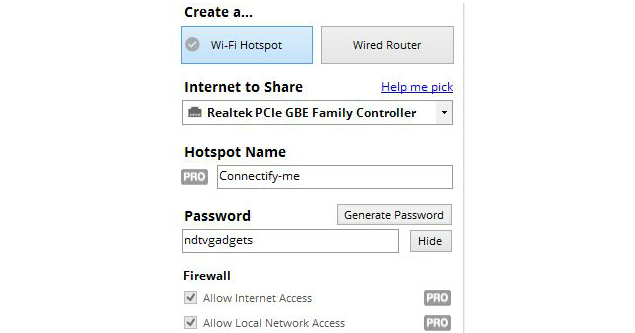
3. You will be able to see two tabs in the app – Settings and Clients. In the Settings tab “Create a…” Click on Wi-Fi hotspot inside.

4. Below Internet to share you will see a drop-down menu. Expand it and select the connection you want to share. We tested this app with wired and wireless connections, it worked fine in both the circumstances.

5. You will be able to see many more options in the menu. Enter the password for Wi-Fi. Click Start Hotspot.

That’s all you need to do. Now your other devices will start detecting a Wi-Fi network named Connectify-me. Enter the password and use the internet without any hassle.

Connectify is a paid app, but there is also a free version available with some less features. You can create a hotspot with the help of the free version, but the biggest drawback is that it will automatically disconnect after every 30 minutes and every time a pop-up will appear, asking you to purchase the Pro version. You have to manually re-enable the hotspot every time.

The Pro version has more features and costs $25 (Rs 1,550) for a one-year license and $40 (Rs 2,450) for a lifetime license. This version has features like unlimited hotspot uptime, custom hotspot naming, internet sharing from 3G and 4G networks (USB internet dongle) and advanced firewall controls.

Internet Sharing on OS X

This process is very easy for Mac users. In this way you can share the Mac’s Internet connection.

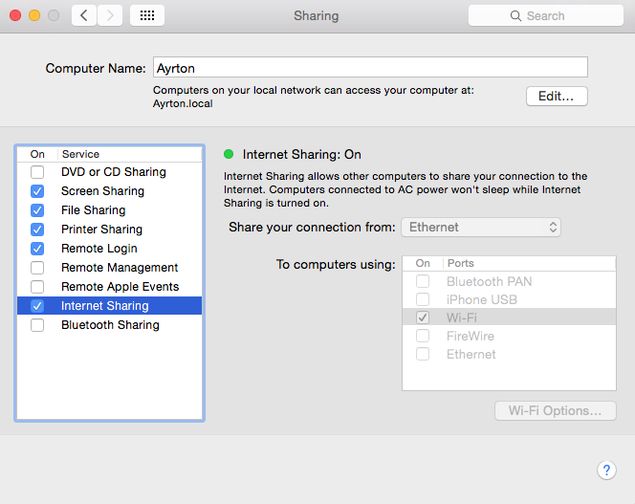
1. Open System Preferences. After this go to sharing. Then check Internet Sharing.

2. Expand the drop-down menu after Share your connection on the right, select the connection you want to share. You can share your Internet connection via Ethernet, Wi-Fi, Bluetooth, or iPhone USB.

If you’re using a wired Internet connection on an iMac, Mac Pro, or MacBook Pro, you’ll usually want to choose Ethernet. If you’re using an external Ethernet adapter for your MacBook Air, you’ll want to choose USB Ethernet or Thunderbolt Ethernet. However, this will depend on your dongle (usually USB).

3. Below that, there is a box next to To computers using. Here you have to tickmark the box next to Wi-Fi.

4. After this, click on the Wi-Fi Options button below the box. Select Network, then enter the password in the Security Type and Password and Verify fields. We would suggest you to enter the password instead of choosing None in the security option. You can leave the channel at the default value if you don’t know what you are doing. Click OK.

5. If your connection is active, you will be able to see a green icon. Apart from this, you will be able to see Internet Sharing text inside System Preferences.

That’s it! You can start using another device by connecting it to the Internet.

This is how you can turn your PC or Mac into a Wi-Fi hotspot. If there is any other way to do this, let us know through the comment box.

Oppo F9 Review in Hindi, Oppo F9 Review

0

Handset manufacturer Oppo last month Oppo F9 Pro (Review) Launched, the company also announced Oppo F9 during the event. Oppo F9 The price in the Indian market is Rs 19,990. The VOOC Flash Charge technique has not been used in Oppo F9. Oppo F9’s 4 GB RAM variant has been launched instead of 6 GB RAM. A 16 -megapixel rear sensor has been given for photography. Specifications and features have been reduced due to the low price than the Oppo F9 Pro. The F9 Pro in India is priced at Rs 23,990. That is, there is a difference of Rs 4,000 in the price of both handsets. At this price, you will find many brand smartphones which can be a profitable deal. Is Oppo F9 Best smartphone for you? Let’s know.

Oppo f9 design

In terms of side and size, both Oppo F9 and Oppo F9 Pro are both the same. Different finish has been used in both for differences between the two models. The F9 Pro has different patterns and gradients with flashy color scheme. Realme 1 in F9Review) Like diamond cut pattern. Customers can buy the phone in mist black and steeler purple color. It is not necessary to appear at all times, it emerges on the back panel when it falls on the back panel. We have a purple color variant available for review. This color looks slightly different compared to the black and gold colored smartphones present in the market.

This handset of Oppo is made of plastic, the biggest feature of F9 is its display. F9’s notch is smaller than other smartphones, the company named it Waterdrop. A 16 -megapixel front camera will be available for selfie and video calling. The earpiece has got a place just above the selfie camera to make the notch small size. A similar notch can be in the company’s Vivo V11 Pro (Review) and OnePlus 6T.

In the retail box, you will get the phone cover and the screen protector already on the phone. The body of F9 is slightly emerged outwards. Although the back panel is of plastic but it is giving a glass look. Scratches can be easily occurred if the back panel is not covered. The power button on the right, the voice raising and reducing button is given on the left side. On holding the phone correctly in the hand, the fingerprint on the finger back panel easily reaches the sensor. Horizontal rear camera setup and LED flash just above the fingerprint sensor. As you can see in the picture, metal has been used all around to protect the camera module from scratch. The bottom of the phone has a micro-USB port, 3.5 mm headphone jack, loudspeaker and microphone instead of Type-C. The SIM tray is present on the left side of the phone, two Nano-SIM and MicroSD card slot have been given.

Oppo

Oppo F9 Specification and Software

The F9 Pro and F9 have considerable similarity between the hardware. For speed and multitasking, it has a 2 GHz MediaTac Helio P60 octa-core processor with ARM Coretex-A73 core and Coretex-A53 core. The same processor has also been used in Realme 1 and recently launched Nokia 5.1 Plus. Oppo F9 has 4 GB RAM and 64 GB internal storage, storage can be increased to 256 GB with the help of microSD card. There is a 6.3 -inch LTPS display with full HD resolution, which has an aspect ratio of 19.5: 9. The connectivity feature includes 4G VoLTE, Wi-Fi 802.11 AC, Bluetooth 4.2, Glonas and GPS. The battery is of 3500 mAh but it is not equipped with fast charging support. We tried to put VOOC charger in Oppo F9 but it was not charging F9. The Oppo F9 will come with OS Skin based on Android Oreo. We have a handset for review on the July Security Patch.
Oppo

Smart assistants will open when the home screen is pulled from the right side, on the top you will see the search bar, shortcuts of some apps, weather and step counter widget. Like iOS, if the home screen is swiped downwards in this smartphone of Oppo, then the universal search function will open. The Settings app will find many menu and sub menu options. We did not see the search function in the app. This means if you want to find a function, then you will not be able to find with the help of a search bar. The phone has already given several pre-install applications. The Oppo app will also suggest you to install several apps at the app store. During the review, we found that the default browser sends notifications several times a day.

Oppo F9 performance, battery life and camera

The display of Oppo F9 is good, things are clearly visible on the screen when the phone is used in the light. Compatible apps work on full screen mode and non-compatible apps 16: 9 aspect ratios. But you also have the option to stretch these apps on full screen. This handset of Oppo comes with face unlock security, during the review we found that the feature works fast. When we reviewed the F9 Pro, we felt the performance of F9 Pro with other smartphones Honor Play and Huawei Nova 3i found in this price segment. The performance of the phone is better because while using the handset, we did not feel that the phone was slowing down.
Oppo

We saw the PUBG game in F9, we would advise that while playing the game in the phone, keep it on medium quality. The phone did not slow down but it was starting to heat up quickly. We notice that while playing the game, battery consumption was happening rapidly. In 20-25 minutes, about 10 percent of the battery was seen to decrease. In the HD video loop test compared to F9 Pro, we found that the F9 smartphone gives a backup of 14 hours 39 minutes. After playing games, using WhatsApp account and watching online videos, the phone gives one day battery life. Power saving mode has also been given to save the battery.

The lack of VOOC charging technology may disturb you. The phone was charged 29 percent in 30 minutes and 62 percent in one hour. It took 2 hours 20 minutes for the phone to be fully charged. On the back panel of the phone, a 16 -megapixel primary sensor and a 2 -megapixel depth sensor will get a 16 -megapixel front camera for selfie and video calling. Apart from standard photos and video modes, the camera app has portrait mode, stickers, pano, time laps, slow-mo and expert. Before clicking the photo, you can apply flitter, Google lens has also been integrated in the stock camera app. The phone is fast in focusing on anything, as well as photos in daylight have come very sharp and right.

img20180928171112
img20181004110213
img20180930211710
img20181003112221

The focus takes some time when shooting on the macro. The picture comes as a sharp, but it keeps the person and the background separate. The camera performance fade in low light. Portrait mode uses secondary camera, but no option is available for how much blur to blur. But you will definitely get many lighting options. The portrait mode blurred the background more, due to which the photo looks artificial. The F9 Pro has a 25 -megapixel front camera for selfie, while the company has given a 16 -megapixel front camera in F9. Beautification mode and AI are already set which decide the beautification level. Apart from this, you can set the beautification level by yourself. Rear and front cameras are capable of recording video at 1080p. Video stabilization is available when shooting at 1080p from the rear camera.

Our decision

The most attractive feature of Oppo F9 is the waterdrop notch in the phone. Oppo has better designed the handset. Battery life and the performance of the phone in this price is excellent. If the look of the phone more than the specification, the design affects you, then the Oppo F9 is for you. On the other hand, in this price segment, other company phones can be a better profit deal. If you want maximum performance then Xiaomi Poco F1 can also prove to be a great option. We have not yet reviewed the Vivo V9 Pro, but the hardware of this phone is also better.

Motorola One Power Review in Hindi, Motorola One Power Review

0

The Motorola smartphone is known for good build quality, almost stock Android UI, regular updates and aggressive prices. The situation has changed in recent times. Software updates are not regular as before and prices are gradually getting higher. As an example Moto G6 Plus Take it, it was launched for Rs 22,499. This is the highest price of any phone in the Moto G series so far. On the other hand, Moto G6 ,Review) And Moto G6 Play Compared to their challenges, come with weak processors. For this reason, it seems that this phone does not give as much value for money as old Moto G series handset.

Now Motorola new in partnership with Google Motorola One Power The smartphone has launched in the market. This phone is part of Android One Program. The price is Rs 15,999, which is aggressive than the Mozuda Motorola product. Nokia 6.1 Plus, Asus Zenfone Max Pro M1 and Xiaomi Redmi Note 5 Pro Like popular smartphones are available at this price. In such a situation, it will not be easy for Motorola One Power to make your place in the heart of customers. Will this phone be successful in doing this? Let’s know …


Motorola One Power Design

Motorola One Power is the first smartphone of Motorola to come with Nokia in India. The phone has a large 6.2 -inch display. Motorola is branding on the lower back bezel. The phone is a little bulk. Its thickness is 9 millimeters and weighs 205 grams. Keeping the phone in the hands for a long time causes inconvenience. The back of the phone is of the metal plate, but the edges are made of plastic. In comparison, glass has been used to make Nokia 6.1 Plus which gives it a premium look. Motorola One Power has a dual camera setup on the back. The camera module has both lens and dual-tone LED flash.

The fingerprint sensor in Motorola is on the back, with batting logo. Its position is excellent. Power and Volume button have found a place on the right side. The sim tray is on the left side. We liked that it was easy to reach the power button. But there is difficulty in reaching the volume button.

Moto

Headphone jacks and secondary microphones are on top. There are two grills in the bottom, of which the right one has a speaker. It is possible that the speaker gets blocked while using the landscape mode phone. The bottom has USB Type-C port. A large battery of 5000 mAh given in the phone supports fast charging. Motorola gives a 15 watt turbo charger with this phone.

Motorola One Power Specification and Software

The specifications of Motorola One Power are very strong. It seems that Motorola has noticed the handset of other companies before making this phone. Hardware Xiaomi Redmi Note 5 Pro and Nokia 6.1 Plus. Qualcomm Snapdragon 636 processor has been used in the handset. It is an octa-core chipset. One power has only one variant that comes with 4 GB RAM and 64 GB storage. It is possible to use microSD card up to 256 GB if needed.

The 6.2-inch LTPS IPS display is full-HD+ resolution. Its aspect ratio is 19: 9. The viewing angles are excellent. There is no difficulty in reading on the display in outdoor. Motorola has provided the facility to control the color temperature of the display in this phone. Bluetooth 5.0, dual-band Wi-Fi 802.11 b/g/n/AC, GPS, FM Radio and USB OTG are supported. It comes with dual-sim support. But it does not have dual 4G support. This means that only one SIM will work on 4G networks, the second on 3G network.

Motorola

Being part of Google’s Android One program, Motorola One Power has a pure stock Android. It runs on Android 8.1 Oreo. This phone is guaranteed to get security updates for three years and Android updates for two years. At the launch, Motorola had informed that work is going on to bring Android Pie for this phone. The beta version will be released soon. If you have used stock Android or you like this custom more than UI, then you will like Motorola One Power.

Motorola has also given Moto Actions in the phone. Users will be able to do action in the phone with the help of gestures. Motorola One Power has a double chop gesture of moto, making the flashlight active. It is possible to activate the camera app by double twist. The Moto Display feature activates the display when the feature notification and pick up the phone.

Motorola One Power Performance, Battery Life and Camera

Motorola One Power has a very strong processor. While using the smartphone, we did not realize it to slow down. You can easily do multitasking. It has 4 GB RAM which makes multitasking smooth. By the way, we found that the smartphone took some time to unlock while using fingerprise scanner. The display is vibrated after scanning the fingerprint. But it was slow in activating the display. It does not have a face unlock feature which has become a part of almost every smartphone today.

In our HD video loop test, the phone supported for 16 hours 8 minutes which was possible due to the 5000 mAh battery of this phone. Motorola One Power has a battery life. After the battery is completely finished, the 15 -watt turbo charger also charges the phone rapidly. The phone’s battery was charged 31 percent in 30 minutes and 71 percent in 1 hour. It took about two and a half hours to have full charge.

Motorola

There is a dual camera setup on the back. The primary sensor is 16 megapixels. This phase detection is equipped with auto focus. The second is a 5 megapixel depth sensor. The front panel has a 12 -megapixel selfie camera. It is equipped with F/2.0 aperture. Motorola’s camera app has modes like photos, videos, portraits and experts. In expert mode you will be able to control white balance, exposure, ISO and shutter. HDR, flash, timer and toglest for separate aspect ratios are given. The camera app also has Google lens support, that is, you will be able to search about it by focusing on an object.

Tap to see the Motorola One Power’s camera sample in full-size

In the light of the day, the forest power quickly examines the scene and prepare the camera for the shot. We were successful in capturing good detail pictures from one power camera in the delite. In the macrose shot, it was difficult to focus according to our desire, due to which we had to tap on the screen several times. But after focusing, the camera took sharp pictures. The camera performance falls in low light. There is a lack of details with sharpness in the photo. Night mode is available. But the phone automatically does not activate this mode. To use this mode, you have to go to settings and make changes again and again. Photos in night mode come with more sharp and better details.

The secondary depth sensor is used in portrait mode. You can fix the level of background blur. Edge detection in the portrait shot taken by us was good and it did not look unnatural from anywhere. The selfie camera took a good selfie. Selfie flash proves to be a feature of work in low light. The phone has a beautification togle. Which smooths the output. Auto HDR mode is also available for selfie cameras. Motorola has also given Deppth effect with a selfie camera. You will also be able to decide the level of background blur here. Photos are good. But the edge detection remains average. You will be able to record 4K videos from the primary camera and up to 1080 pixels from the selfie camera. The output is not a video stabilization due to lack of stabilization.

Our decision
Motorola One Power has been launched in the market at the right time. Especially looking at its price. Its build quality is good and it will run on pure stock Android. The most important feature of the phone is a large battery of 5000mAh. Being a new Android One program part, this phone is guaranteed to get security updates for three years and Android update for two years. But it does not have dual 4G, which is a shocking decision given the price. Overall, One Power is an all -rounder handset. This will seem to be a lot of people who want a strong battery life with stock Android in this segment.

However, difficulties for One Power are also big. Those who come with this hardware Nokia 6.1 Plus And Asus zenfone max pro m1 Will challenge strong. You will get better build quality in Nokia’s phone and it is also part of Android One Program. On the other hand, Zenfone Max Pro M1 has more RAMs and is also the cheapest among all three. For power user Xiaomi mi a2 ,Review) It is made that cost (Rs 16,999) is slightly higher. But it comes with powerful hardware and better camera.

Xiaomi Redmi 6A Review, Xiaomi Redmi 6A review

0

To keep its hold in a segment with budget smartphones, Xiaomi has launched three new smartphones of the Redmi 6 series. Redmi 6 under Redmi 6 Series, Redmi 6A And launched Redmi 6 Pro. The cheapest of these is the model Redmi 6A. Redmi 5A The upgrade version of Redmi 6A. The price of Xiaomi Redmi 6A starts at Rs 5,999. This price will be sold for 2 GB RAM and 16 GB storage variants. The company has kept this price for the first two months. After this the price change is possible. Some new features have also been added to the Redmi 6A to give a tough challenge to other companies. Let us tell you whether it is the best smartphone for low -budget customers or not? Let’s know ….

Design of Xiaomi Redmi 6A

Your eyes will first go on the screen. Xiaomi has made 18: 9 screen part of the initial budget this time. The front panel of the phone is giving plane and simple look. The edges of the screen are slightly curved, which look good. The display is not completely uninterrupted. There are still a lot of bezel on top, bottom and edges. But the overlock look is quite sleek. The body of Redmi 6A is of plastic. There is nothing shocking in this. Redmi 6A will be available in Black, Blue, Gold and Rose Gold colors. The black unit we got for review is good in appearance. But during the use, there were fingers on its back.
Xiaomi

The camera is slightly embossed on the back panel. Xiaomi Redmi 6A weighs 145 grams. The button to increase and reduce power and voice is on the right side, the fingers reach the button easily. There is a 3.5 mm headphone jack on the upper part of the phone and the Mico-USB port at the bottom. The speaker is downwards on the back. This means that the sound of ringtone or alert will not come clear when placed on the bed or any other surface. You will not get a fingerprint sensor on the back panel of this phone. However, in this budget, in the smartphones of other companies, you have been given a fingerprint sensor for security. There are two separate trains on the left side. One is for a single nano SIM card and the other has a Nano-SIM and a slot for a separate microSD card.

Xiaomi Redmi 6A specification and software

Xiaomi has used the new Helio A22 processor of the MediaTek brand, not the chipset of Qualcomm 400 Series in this phone. This is the first chipset of MediaTek’s new Helio A series. It is made from 12 Nm process. That is, better battery life is expected. It is possible to use 4G data from any SIM in Redmi 6A. But at one time only one SIM will support VoLTE HD, irrespective of the slot. The storage based Redmi 6A has two variants- 16 GB and 32 GB. Both variants come with 2 GB RAM. Our review unit had 16 GB storage. We have 16 GB RAM variants available for review. We found that only 10 GB was available for use in the phone after pre-install apps. The phone has support for microSD cards up to 256 GB. The screen of 18: 9 is 5.45 inches. Its resolution is 720×1440 pixels. A 3,000 mAh battery is provided for power backup.
Xiaomi

In the phone, you will already get UC browser, Chrome and Xiaomi’s Default Browser, Facebook, Amazon, PhonePe, Netflix, Opera and other third party apps. The phone has a facemoji keyboard equipped with emojis, stickers, GIF, theme and other things. Apart from this, you will get Microsoft apps in the phone. Mi Music and Mi Video are filled with vigorous content. Spam is also present in the Gallery app, after playing the recorded video, we saw a screen that suggests the uproar video. Theme apps, in the Settings app, you will see advertisements on the Puri screen in the storage cleaner function and security app. After seeing so many advertisements, we definitely got some disappointment. It would be wrong to say that the MUI interface is not good. It will get features like UI Customization Viction, Clone Apps, Display Color Ron Adjustment, Gesture etc.
Xiaomi

Xiaomi Redmi 6A performance, battery life and camera

This budget of Xiaomi will not disappoint you for using smartphones. After switching from one app to another and closing the app, the phone slows down slightly. You can use them one or two seconds after the message and other apps loaded. Sometimes it took some time for one or two apps to start. If you want, you can hide onscreen Android navigation button and use gathering instead. But according to us these are very slow. The keyboard also harassed occasionally. But Google’s Gboard is already installed. Just 2 GB RAM is not enough for Android.
img
img
img
img

The screen size for playing videos and games is quite good. We did not face any problem in the viewing angle of Xiaomi Redmi 6A. The voice of the speaker on the back panel is not very good. Antootu scored 61,053 in Redmi 6A, 765 in Geekbench’s single-core and 2,306 in multi-core test. It has got a 20FPS score in the GFXBench T-Rex test, although the 3D game phone does not run well. 3D Mark Ice Strome Extreme Test has 5,451 score and 453 score in Silangshot Test.

A 3,000 mAh battery is provided for power backup. Redmi 6A supported 13 hours 22 minutes. The credit will be credited to processor and MIUI optimization. Its battery in common use will support you throughout the day. If you do not use the phone too much then the battery will last for about one and a half days. On the other hand, the battery takes about 3 hours to have a full charge from zero. WiFi for connectivity 802.11 b/g/n, Bluetooth version 4.2 and GPS. Redmi 6A runs on MIUI 9.6 which is based on Android 8.1 Oreo. Our review unit had received the security patch of August 2018. Currently, no information is available about Android 9.0 Pie update. Redmi 6A did not disappoint most of the time in use. Many times the leg was realized. But there is no problem with this. It takes about 3 hours to have a phone summary to have full charge from 0.

Xiaomi

The camera quality of low -priced phone is not as great. If you want to capture the best photo, then this phone is not the best for you. This phone is right for those who only have to click the actual picture and share it on social media and messaging apps. The rear has a 13 -megapixel camera. It is equipped with F/2.2 aperture and PDAF. Our sample shots came well. The details were satisfactory and the focus was also sharp. There were some shots in which it was clear that the focus was not locked on the perfect spot. Small bright objects or parts of the frame were very strange. Colors bright and vibrant usually came.

While taking photos at night, we had to take special care of things like staying stable and saving the phone from moving. Pictures came well when the source of light was sourced nearby. Photos in low light areas completely black. We found that whatever the situation, Redmi 6A takes about one or two seconds to save the pictures. You will be able to record videos up to 1080 pixels resolution. But these are the sake and a few zerie records. Photos taken in Bright Sunlight came out of untouchable and excessive sharp. The performance of the 5 megapixel front camera is satisfactory. Photos come only with entry level quality. The camera app has features like time laps and Panorama mode.

Our decision

If seen, Redmi 6A, Redmi 5A is a great update. Redmi 6A provides long screen and better processor. The price of Rs 5,999 is also breathtaking, especially by looking at the rupee. But the price of Redmi 5A was more breathtaking worth Rs 4,999. This is also a “introductory” price of Redmi 6A. We do not know how long the price will remain. In Redmi 6A, you will get 3 GB RAM and 32 GB variants 2 GB RAM and 16 GB storage. If you are ready to spend a little more money, then you will get 3 GB RAM and 32 GB storage variants of Redmi 6 with better processor and fingerprint sensor. As far as the challenges are concerned, Redmi 6A is much better than the rest of its price phones. Whether coolpad mega 5A or more expensive Honor 7s. We will say that even if the price of this phone is more than Rs 1,000, it is still a better option.

Realme 2 Pro Review in Hindi, Realme 2 Pro Review

0

The new strategy of Chinese smartphone maker companies is to make a sub-brand first, then young customers should be wooed. Huawei’s Honor brand, Lenovo’s Zook Brand and most recently Xiaomi’s Poco brand. Following this path, Oppo launched Realme in the market. All these brands have been an important effort, powerful specification in aggressive price.

Realme is now a separate company. Now Realme 2 Pro Has been launched about Realme 2 ,Review) It was reported during the launch of. The use of ‘Pro’ in Realme 2 Pro smartphone is a point towards the powerful hardware of this smartphone. Through this phone, the company wants to woo students and youth. The handset looks very strong on paper. How is its performance in real world? Let’s know ….


Realme 2 Pro Design

Realme 2 Pro gives a feeling of growing in hands. We had difficulty in using this phone with one hand, but it is not too heavy. The thickness of 8.5 millimeters will be considered wide, but the grip is good due to curved polycarbonate edges. There are many layers of lamination on the back of the phone, which gives a feeling of its glass panel. In Reality’s tongue, “Crystal -like Dudrop” effect. The fingers of the fingers are easily fallen on it.

The phone comes with a 6.3-inch full-HD+ display Gorilla Glass 3 protection. Bezel is very slim all around. On touching the hands, the edges are slightly rough, especially with the pre -given screen protector. The ‘Dudrop’ Nokia design is gradually coming into trend. It consumes very little space and also looks good. Despite having less space, it has space for front camera. There is no notification LED. The earpiece is just above the front camera. The sensors are on the right side.

Realme

Power and volume buttons are on different edges of the phone. The fingers do not have difficulty in reaching them. The SIM tray has separate slots for two nano SIMs and microSD cards (up to 256 GB). The phone supports dual 4G VoLTE. But due to the Vietnamese unit for the review, it could not be tested. Dual 4G worked on using two Airtel SIMs. But there was no togle for VoLTE. Reality says that the retail unit will support dual 4G VoLTE.

The lower back has a speaker grill, micro-USB port and 3.5mm headphone socket. In landscape mode, the chances of blocking the speaker are increased when the phone is caught. You can avoid it by flipping the phone on the other side. The fingerprint sensor is on the back. It works fast. The rear dual camera module was embossed out of the surface. But during the use, there was no scratch marks on its glass. The retail box will feature 10 watt charger, micro-USB cable, SIM Ejector Tool, Silicon Cover and Instructions book.

Realme 2 Pro Specification and Software

The specifications of Realme 2 Pro are very strong. All variants have used Qualcomm Snapdragon 660 processor which is a powerful octa-core chipset. This chipset in the price range of less than Rs 20,000 Xiaomi mi a2 ,Review) And Vivo v9 pro Get in The benchmark score also makes its strong specifications reasonable.

The phone based on RAM and storage has three variants- 64 GB storage with 4 GB RAM, 64 GB storage with 6 GB RAM and 128 GB storage with 8 GB RAM. It does not have FM radio or NFC support. The top variant of Realme 2 Pro is the first phone to come with 8 GB RAM in this price range. Other specifications include Bluetooth 5, dual-band Wi-Fi 802.11 AC, USB-OTG, gyroscope, ambient light sensor, proximity sensor, compass and accelerometer. It does not have FM radio or NFC support.

Realme

Realme 2 Pro runs on Android 8.1 Oreo -based ColorOS 5.2. The security patch of September was also present in the phone. The latest version of ColorOS also has a two step process to dismiss notifications. Apart from this, OS is quite polished and the user gets many customization options with gestures. Our review unit was the Vietnamese model. Many Vietnamese apps were already installed in it. These apps will not remain in the retail unit sold in India, but nothing can be said about whether any other apps will be in advance.

Apart from fingerprint sensor, the phone also has face unlock. It recognizes you quickly. The eyes work only when the eyes are open, that is, it is very secure. The screen light up to help in low light. If you want, you can also use face recognition to lock apps and private space. This will unlock the phone.

Realme 2 Pro Performance, Camera and Battery Life

We used Reality 2 Pro for several days. Honestly, we have no complaint. The UI is usually smooth, except for some shortcomings of ColorOS. We never realized slow down while loading a game with multitasking or powerful graphics. The phone is not too hot too. The area around the fingerprint sensor is slightly hot, that too after playing games or using camera for a long time. Call quality is good and call recording in the dialer app is also built in.
Realme

The Realme 2 Pro has a 16 -megapixel primary camera on the rear, which is F/1.7 aperture. It captures photos with details in the delite. We saw a good dynamic range in the landscape shot. Small objects also came with a lot of details and accurate colors. Wide aperture brings good bokeh effect to close up shot. We had difficulty in getting a clear shot of the moving object, but in addition to the autofocus was working fast.

Tap to see Realme 2 Pro’s camera sample full size

Secondary 2 megapixel sensor does not do any work in image captains process. Its job is to assess depth. Photos are good in portrait mode. Edge detection is clear. The sharpness of the object is also clear in Artificial Lightning. You have many lightening modes to choose from which gives good effects. Photos in low light are a little granney. Details also decrease, especially in landscape shot. Closeup shot is low in sharpness. But overall photos are used to be used.

1080 pixels videos come of good quality. Electronic image is stabilization that works well. There is also support for 4K recording. The quality is very average and no stabilization is present. Videos shot in low light come granny.

Realme has also given a 16 -megapixel front camera. It comes with Bokeh Effect, HDR and screen flash. Image quality comes well. Details could have been a bit better. The screen flash is very effective. But it messes up the tone of your skin. There is also a stickers shooting mode with the help of which you will be able to put different AR stickers on the face of others or others.

The 3500 mAh battery easily supported the whole day. In our video loop test, it lasted for 10 hours 22 minutes which is slightly better than the average. The phone does not support fast charging. But the charger given with the phone charged the battery 64 percent in an hour. It took it about 2 hours 20 minutes to get a full charge from zero.

Our decision

Realme 2 Pro meets the claim of being a powerful phone. We feel that it will entice many people, especially its price. The phone’s 8 GB RAM and 128 GB storage variant is Rs 18,990. If seen, it shows more appeal from Mi A2 or Vivo V9 Pro. Both these phones come with Snapdragon 660 processor. The initial variant of the phone is Rs 13,990. it Xiaomi Redmi Note 5 Pro ,Review, Nokia 6.1 Plus, Motorola One Power, Asus zenfone max pro m1 6 GB RAM variant and Realme 1 ,Review) The 6 GB RAM will challenge the variant.

Sharp and Vivid displays, good build quality, solid app and gaming performance, go in favor of Realme 2 Pro. Low-light photography and video performance can be better. We wish that Reality (and Oppo) get rid of the process of disturbing the notifications.

By the way, if you are looking for an all -round phone in the price segment of Rs 20,000, then this is a great option.